# Staging
Rust has a public staging branch on which players test new features early and reports bugs/helps testing. Upcoming map changes are also public on there usually the last Thursday in the current month (1 week before force wipe)
We make use of this branch so maps can be prepared days in advance before force wipe for map votes, testing etc.
Depending on the size of the changes we aim to enable the staging generation on 3-6 days before force wipe. Exact dates can be found [here](https://rustmaps.com/schedule#staging).
Staging maps should only be used on servers after the upcoming force wipe update as they may be incompatible with the current server version.
Roughly 1 hour before the force wipe we will update the site and make staging the default maps.
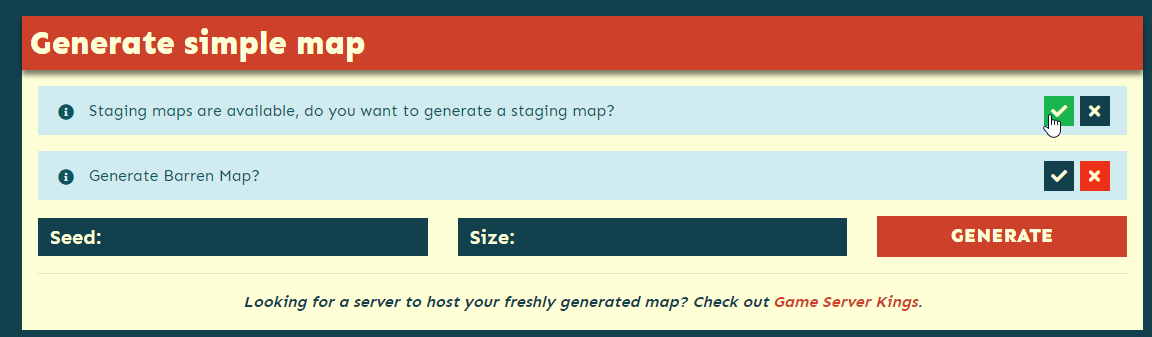
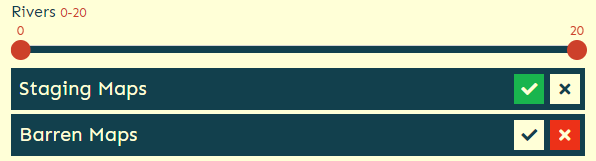
The staging option can be found in the following places once enabled:
Map Generator
Custom Map Generator
Gallery to search staging maps
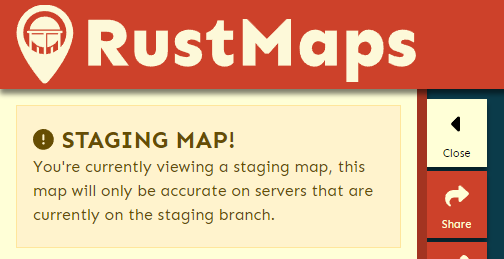
Staging generated maps will have a little warning like this
---
# Agent Instructions: Querying This Documentation
If you need additional information that is not directly available in this page, you can query the documentation dynamically by asking a question.
Perform an HTTP GET request on the current page URL with the `ask` query parameter:
```
GET https://guides.rustmaps.com/staging.md?ask=
```
The question should be specific, self-contained, and written in natural language.
The response will contain a direct answer to the question and relevant excerpts and sources from the documentation.
Use this mechanism when the answer is not explicitly present in the current page, you need clarification or additional context, or you want to retrieve related documentation sections.